
Task progress workflow
Turn task progress into a clear team flow
Ping builds the handoff into the task itself, so blockers, approvals, and next actions stay visible until the work can move forward.
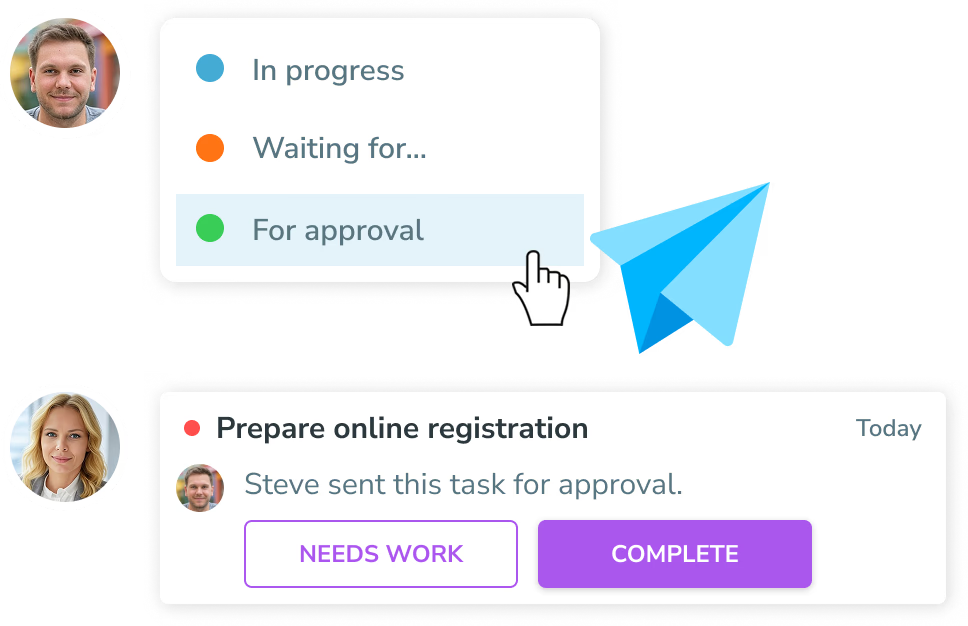
A simple workflow for work that cannot be dropped
Ask for help without losing context
Choose who you are waiting on. Ping adds the status to the task and alerts the right person.
Check it when the work is ready
Check the task to move it from In progress to For approval. It leaves the assignee's active work while the requester reviews it.
Approve it to make it Completed
The requester gets a persistent approval action. Accepting completes the task; requesting changes returns it to In progress with a comment.
Progress × notifications
Every handoff has an owner and a next action.
Waiting for help and For approval are not ordinary updates. Ping keeps them in the Actionable part of Notifications until somebody responds, while Completed is reserved for work the requester has accepted.
See how Smart notifications workWhy teams use Ping task statuses
Fewer invisible blockers
Everyone can see who has the ball and what is keeping the task from moving forward.
Cleaner personal lists
Checking a ready task clears it from the assignee's list while the requester gets the review action they own.
Built-in accountability
Approvals and change requests stay connected to the task, with the comment and context ready for the next step.
How to use the task progress flow
- Start in In progress. Work on the task normally while it is assigned to you and visible in your active list.
- Choose Waiting for. Select the person who can answer a question, provide an input, or remove the blocker.
- Check the task for approval. When your work is ready, check the task. Ping moves it to For approval and removes it from your active list.
- Accept or request changes. The requester approves the result to make it Completed, or leaves a comment to return it to In progress.
Task progress FAQ
What happens when someone is waiting for help?
While a task is In progress, the assignee can set it to Waiting for and choose the person who can unblock it. Ping adds a visible status badge and sends that person an Actionable notification that stays open until they confirm they helped.
Who can I choose in Waiting for?
You can choose the person who requested the task, someone from the task's board, or a contact in Ping. That keeps the handoff attached to the work instead of buried in a chat thread.
How does a task move to For approval?
The task starts In progress. When the assignee checks the task's checkbox, it moves to For approval and leaves the assignee's active work. The requester receives an Actionable approval notification.
When does a task become Completed?
Only after the requester approves the task. If the result needs work, the requester can send it back with a comment and it returns to In progress instead.
Keep every task moving.
Capture. Plan. Do. The AI way.
Get Started