
AI Task Assistant
Get help with a task, right inside Ping
Open the AI Assistant tab in any task and get ideas, clarifying questions, next steps, or help writing content without leaving your Ping workspace.

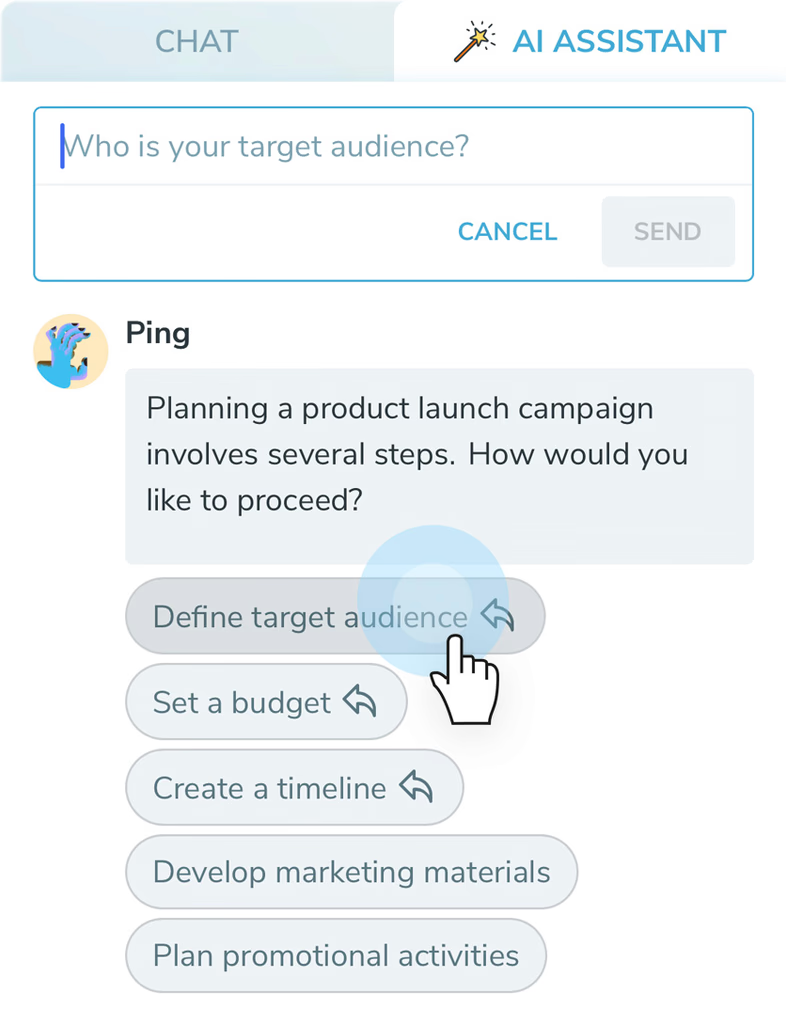
How the AI Task Assistant works
Open the task you are working on
Keep the task, its context, and the help you need in one place.
What should I do next?
Switch to AI Assistant
Choose the assistant tab in the task panel and describe what is blocking you.
Turn guidance into progress
Use suggestions, drafts, and follow-up questions to decide what happens next.
Start by defining your target audience, then set a budget and create a timeline.
Two complementary ways to use Ping
Inside Ping, not inside ChatGPT
AI Task Assistant
You are already in Ping, looking at a specific task. The assistant uses that task as the starting point and helps you move it forward.
ChatGPT integration
You are in the ChatGPT app and use Ping Task Manager GPT to create, edit, assign, or browse Ping tasks from a conversation.
Learn about ChatGPT integrationWhat the assistant can help with
Find the next step
Turn a vague task into a short, useful action plan.
Write a first draft
Get help with emails, briefs, notes, and other task-related content.
Keep momentum
Ask questions when you are stuck instead of leaving the task unfinished.
How to get started
- Open a task in Ping. Choose the task where you need a little help or a clearer next step.
- Choose AI Assistant. Open the AI Assistant tab inside the task conversation panel.
- Ask for help. Describe what you are trying to do and let the assistant suggest questions, ideas, or a draft.
- Apply the useful part. Use the response to clarify the task, write content, or decide what to do next.
AI Task Assistant FAQ
What is Ping's AI Task Assistant?
The AI Task Assistant is a helper inside a Ping task. It can ask clarifying questions, suggest next steps, offer tips, and help you write task-related content without leaving the Ping app.
Is the AI Task Assistant the same as the ChatGPT integration?
No. The ChatGPT integration lets you manage Ping from inside the ChatGPT app. The AI Task Assistant works the other way around: you open a task in Ping and ask for help there.
Where does the assistant work?
Open an existing task in Ping and choose the AI Assistant tab. The assistant uses the task context to help you move that specific piece of work forward.
What can I ask the assistant to do?
Ask for ideas, a clearer next step, a short draft, or help breaking a task into smaller actions. It is designed for in-task guidance rather than replacing your task list.
Make every task easier to start.
Capture. Plan. Do. The AI way.
Get Started